

Everything you need to know about Angular’s reactive primitives
from signal() to effect(), with practical examples and real-world patterns.
If you’ve been building Angular apps for a while, you’ve probably asked:
- Why did this component re-render?
- Why did change detection run for the entire app?
- Why do I need RxJS for simple state?
For years Angular relied on Zone.js and global change detection. It worked but it wasn’t always predictable or efficient.
Angular Signals change that.
Signals introduce a fine-grained reactive system that lets Angular update only what actually changed, without scanning the entire component tree.
Since Angular 16 introduced Signals as a developer preview, the system has matured rapidly. By Angular 20, all core primitives are stable, and Angular 21 pushes the model even further with Signal Forms and zoneless applications by default.
This guide explains every Signal API, how it works, and when you should use it in real applications.
signal() — Writable Reactive State
The signal() function is the foundation. It wraps a value and notifies consumers when that value changes.
counter = signal(0); userName = signal('Angular'); items = signal(['Item A', 'Item B']);
Reading: a signal is simple — call it like a function:
console.log(this.counter()); // 0
Writing has two options:
this.counter.set(5);

// replace the value
this.counter.update(c => c + 1);

// transform the current value
this.items.update(list => [...list, 'New Item']);
computed() — Derived Read-Only Signals
computed() creates a signal whose value is derived from other signals. It’s read-only, lazy, and memoized.
counter = signal(0);
userName = signal('Angular');
items = signal<string[]>(['A', 'B', 'C']);

doubleCount = computed(() => this.counter() * 2);
greeting = computed(() => `Hello, ${this.userName()}!`);
itemCount = computed(() => this.items().length);
When counter is 3, reading doubleCount() returns 6. The derivation function only runs when you actually read doubleCount and its dependencies have changed since the last read. If you read it again without changing counter, you get the cached value instantly.
This makes computed signals safe for expensive operations like filtering large arrays — the computation happens once and is cached until its dependencies change.
An important nuance: only signals actually read during the derivation are tracked. If you have conditional logic inside a computed, the dependency graph can change dynamically:
const showCount = signal(false);
const count = signal(0);

const conditionalCount = computed(() => {
  if (showCount()) {
    return `The count is ${count()}.`;
  } else {
    return 'Nothing to show.';
  }
});
When showCount is false, changing count won’t trigger a recomputation. Angular is smart about tracking only what’s actually used.
linkedSignal() — Writable Computed
linkedSignal() solves a pattern that used to require awkward workarounds: a value that resets automatically when its source changes but can also be manually overridden.
selectedCategory = signal('Fruits');
availableItems = computed(
() => CATEGORY_ITEMS[this.selectedCategory()] ?? []
);

// Resets to first item when category changes,
// but user can manually pick a different one
selectedItem = linkedSignal(() => this.availableItems()[0]);
Think cascading dropdowns. When you change the category, the selected item resets to the first available option. But the user can still pick a different item, and that selection sticks until the category changes again.
This pattern comes up everywhere: form defaults that reset, tab selection with auto-pick, any “reset + override” scenario. Before linkedSignal, you’d need a combination of computed, manual subscriptions, and imperative logic. Now it’s a single line.
input() / output() / model() — Component Communication
Angular’s decorators (@Input(), @Output()) have signal-based replacements that integrate seamlessly with the reactivity system.
- input() creates a read-only signal from parent props:
label = input('Default');
count = input.required<number>();
- output() replaces @Output() + EventEmitter:
countChanged = output<number>();

// Emit an event
this.countChanged.emit(value);
- model() enables two-way binding as a signal. Parent and child stay automatically synced:
colorTheme = model('blue');

// Parent template:
// <app-child [(colorTheme)]="parentColor" />
The advantage isn’t just syntax — because input() returns a signal, you can use it directly in computed() and effect() chains. Everything composes naturally.
viewChild() / viewChildren() — View Queries as Signals
Querying template references and child components is now reactive:
myInput = viewChild<ElementRef>('myInput');
childRef = viewChild(SignalChildComponent);
listItems = viewChildren<ElementRef>('listItem');

listItemCount = computed(() => this.listItems().length);

focusInput() { this.myInput()?.nativeElement.focus(); }
callChild() { this.childRef()?.increment(); }
These signals are always up-to-date. No lifecycle hooks, no manual refresh. When the DOM changes, the signal updates, and anything that depends on it reacts automatically.
contentChild() / contentChildren()— Content Projection Queries
The same pattern applies to projected content (elements passed via `<ng-content>`):
// Inside a wrapper component
projectedTitle = contentChild<ElementRef>('projectedTitle');
projectedItems = contentChildren<ElementRef>('projectedItem');

itemCount = computed(() => this.projectedItems().length);

<app-content-wrapper>
<h5 #projectedTitle>Projected Title</h5>
@for (item of items(); track item) {
<p #projectedItem>{{ item }}</p>
}
</app-content-wrapper>
Same API shape as viewChild/viewChildren, just scoped to projected content instead of template-owned elements.
effect()— Reactive Side Effects
effect() runs a callback whenever any signal it reads changes. It’s the escape hatch for imperative operations — DOM manipulation, logging, localStorage sync, API calls.
effect(() => {
const count = this.counter();
console.log(`Counter changed: ${count}`);
});
Effects auto-track dependencies: any signal called inside the callback is tracked. When it changes, the effect re-runs.
For cleanup (timers, subscriptions, event listeners), use onCleanup:
effect((onCleanup) => {
if (this.timerEnabled()) {
  const id = setInterval(() => {
  this.timerValue.update(v => v + 1);
  }, 1000);
  onCleanup(() => clearInterval(id));
}
The cleanup function runs before each re-execution and when the effect is destroyed. This prevents the memory leaks that were common with manual subscription management.
A word of caution: effects can create closures over external variables, so be mindful of potential memory leaks. Do not set or update signals inside an effect unless necessary. Use effects for side effects only — for derived state, prefer computed().
toSignal() / toObservable() — Bridging RxJS
You don’t need to rewrite your RxJS code overnight. Angular provides two bridge functions for gradual migration.
- Observable → Signal:
clock = toSignal(interval(1000), { initialValue: 0 });
// Use in template: {{ clock() }}s elapsed
- Signal → Observable (and back):
searchQuery = signal('');

debouncedSearch = toSignal(
toObservable(this.searchQuery).pipe(debounceTime(300)),
{ initialValue: '' }
);
This pattern lets you keep existing RxJS pipes for complex async flows while exposing the result as a signal for template consumption. Bridge at the boundary, not everywhere.
untracked() — Opt Out of Dependency Tracking
Sometimes you need to read a signal’s value inside an effect or computed without subscribing to it. untracked() does exactly that.
effect(() => {
const count = this.counter(); // TRACKED
const name = untracked(() =>
this.userName() // NOT tracked
);
console.log(`counter=${count}, name="${name}"`);
});
Changing counter re-runs the effect. Changing userName alone does not. This is useful for logging, snapshots, or reading contextual data without creating unwanted re-execution.
Signals Best Practices
Prefer computed over effect
Use computed() for derived state.
❌ Bad
effect(() => {
this.double.set(this.count() * 2)
})

✅ Good
double = computed(() => this.count() * 2)
Keep effects for side effects only
Use effects for:
- logging
- API calls
- localStorage sync
- DOM operations
Avoid using them to manage application state.
Keep signals small and focused
Instead of one large state signal:
❌
state = signal({ user: {}, theme: '', notifications: [] })
Prefer multiple signals:

✅
user = signal<User | null>(null)
theme = signal('light')
notifications = signal<Notification[]>([])
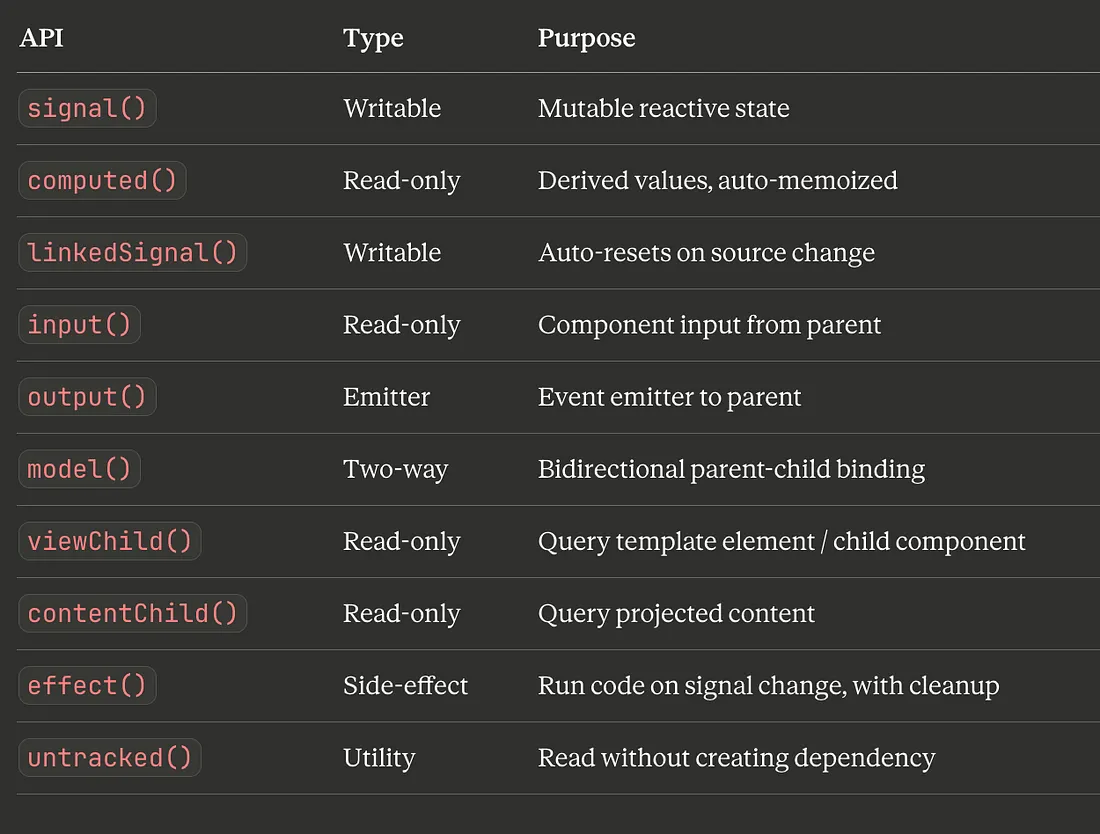
Quick Reference
Final Thoughts
Signals aren’t just a new API, they’re a fundamental shift in how Angular handles reactivity. By wrapping your data in signals, you give Angular everything it needs to perform the most optimal DOM updates possible. No more Zone.js overhead. No more wondering why your component re-rendered.
The migration path is gentle: toSignal() and toObservable() let you bridge existing RxJS code. You can adopt signals incrementally, one component at a time. But the direction is clear — signals are the future of Angular.
Start with signal(), computed(), and effect(). These three cover 90% of what you’ll need. Add linkedSignal() when you hit the reset-on-change pattern. And bridge RxJS where you need it.
The reactive foundation is here. Build on it.