

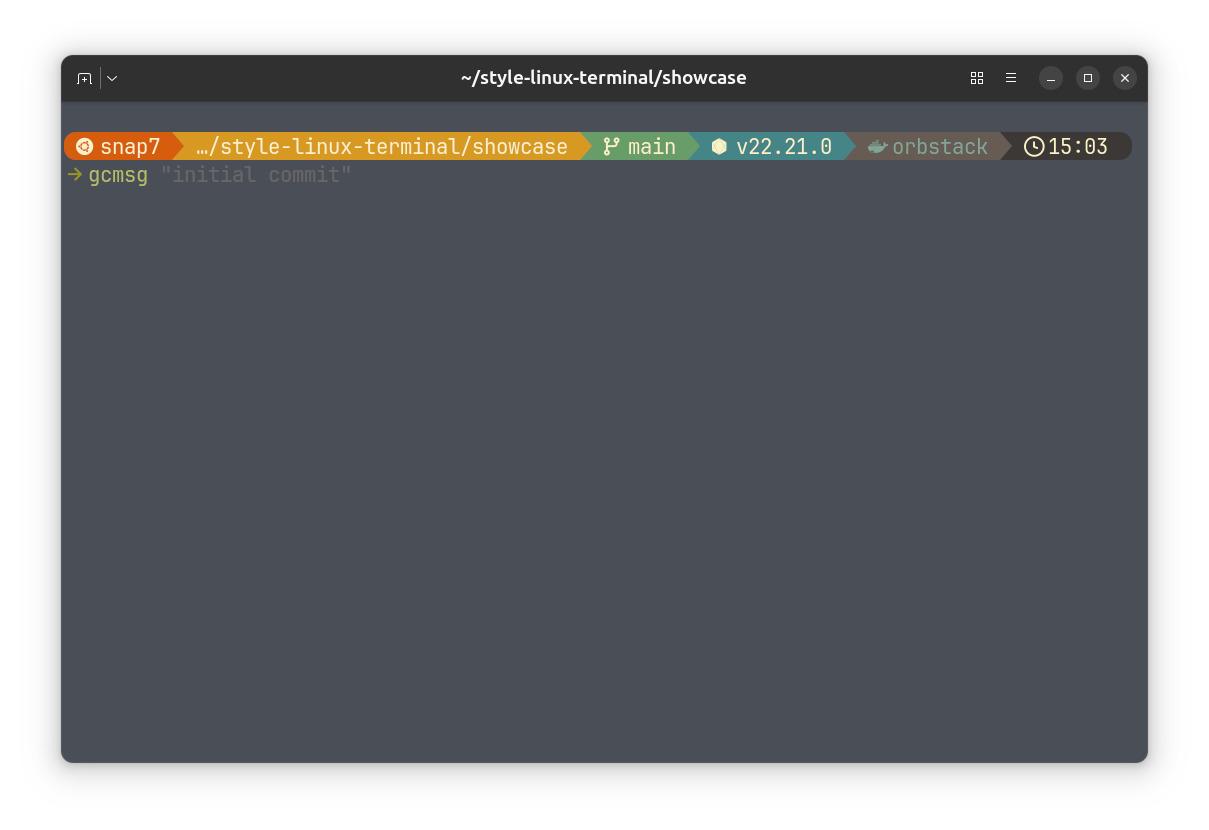
If you spend any time on the command line — or want to — there’s a small set of tools that quietly make the experience much better. Here’s the short tour.
Zsh. Zsh is a shell, like Bash, but with better autocompletion, more flexible scripting, and a healthy plugin ecosystem. On most Linux distros, it’s a single package away, and once you set it as your default shell, everything else builds on top of it.
- Oh My Zsh. Oh My Zsh is a framework for managing Zsh. It comes with 300+ plugins for git, Docker, Kubernetes, Node, Python, and almost any tool you can name. Plugins give you short aliases, smarter tab completion, and helpful one-liners. You enable them by adding a word to a list in your config.
- Starship. Starship is a prompt — the bit of text to the left of your cursor. By default, that’s something forgettable like
user@host:~$. Starship turns it into a small, colourful status line that shows your current folder, the git branch you’re on, the language version of the project (Node, Python, Rust, Go…), how long the last command took, and more. At a glance, you know exactly where you are and what’s going on. - Autosuggestions. As you type, the shell quietly fills in the rest of a command it’s seen you run before, in greyed-out text next to your cursor. Hit the right arrow to accept. Long commands you only half-remember stop being a problem — you start them, the shell finishes them.
- Syntax highlighting. Commands turn green as you type valid ones and red when they’re broken. You catch typos before you hit enter, not after. It’s a small thing that feels surprisingly good once you’re used to it.
Together, these turn the terminal into a place that gives you constant, helpful feedback: where you are, what you’ve done before, what works, and what doesn’t.
You can install each of them by hand — they’re all well documented. If you’d rather not, you can install the whole set on Ubuntu, Debian, Fedora, Arch, and their derivatives. Check out style-linux-terminal.
Either way, the tools are the point. Pick the ones that sound useful, install them at your own pace, and tweak the config until your terminal feels like yours.